S91 Withdraw
S91 Withdraw allows users to submit a withdrawal request directly from their available balance to a selected bank account. Before submitting, check the withdrawal amount, complete the required 1x turnover, select the correct bank and verify the bank account information.
How to Withdraw from S91
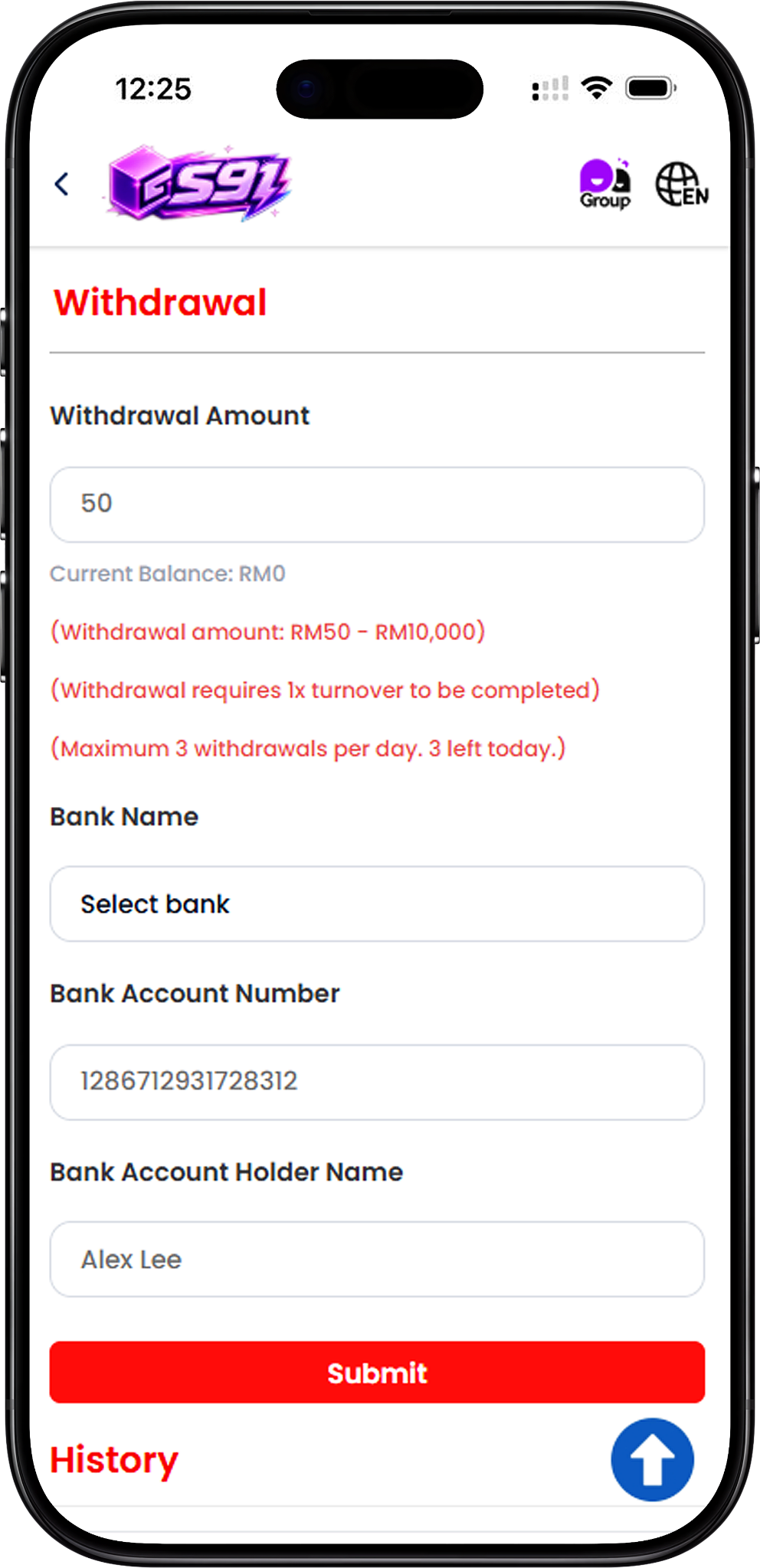
Step 1: Enter the Withdrawal Amount
Open the S91 Withdraw page and enter the amount you want to withdraw. The page displays your current balance together with the permitted withdrawal range so you can review the amount before continuing.
Step 2: Select Your Bank
Go to the Bank Name field and select the bank account that will be used for the withdrawal. Make sure the selected bank corresponds with the account details entered below.
Step 3: Enter the Bank Account Number
Enter the correct Bank Account Number in the provided field. Review the number carefully before submitting the withdrawal request to avoid incorrect bank information.
Step 4: Enter the Bank Account Holder Name
Fill in the Bank Account Holder Name associated with the selected bank account. Check that the account holder information is entered correctly before proceeding.
Step 5: Review Your Withdrawal Details
Before submitting, check the withdrawal amount, selected bank, bank account number and account holder name. The withdrawal page also shows the current balance, turnover requirement and remaining number of withdrawals for the day.
Step 6: Submit the Withdrawal Request
Once all information has been reviewed, select Submit to send the S91 withdrawal request.
S91 Withdrawal Amount and Limits
Withdrawal Amount from RM50 to RM10,000
The S91 withdrawal page displays an allowed withdrawal amount from RM50 to RM10,000 per request. Enter an amount within the displayed range before submitting the request.
Maximum 3 Withdrawals Per Day
S91 displays a limit of up to 3 withdrawals per day. The withdrawal page also indicates how many withdrawal opportunities remain for the current day.
Check Your Current Balance
Your Current Balance is displayed directly below the Withdrawal Amount field. Review the available balance before entering and submitting a withdrawal amount.
Bank Details for S91 Withdrawal
Select the Correct Bank
Use the Bank Name selection field to choose the appropriate bank for your withdrawal. The selected bank should correspond with the bank account information provided in the request.
Verify Your Bank Account Number
Check every digit of the Bank Account Number before submission. The withdrawal form requires this information as part of the bank withdrawal request.
Verify the Account Holder Name
Enter the Bank Account Holder Name shown for the intended bank account. Reviewing both the account number and holder name before submission helps ensure that the withdrawal form contains the intended details.
S91 Withdrawal Turnover Requirement
Complete 1x Turnover Before Withdrawal
The S91 withdrawal page states that 1x turnover must be completed before a withdrawal can be made. Check that the required turnover has been completed before submitting your request.
Review the Requirement Before Submitting
The turnover reminder appears together with the withdrawal amount and daily withdrawal information. Review these conditions before completing the withdrawal form.
Check Your Withdrawal History
View Previous Withdrawal Records
The History section is located below the withdrawal form. Users can refer to this area to check available records of previous withdrawal activity.
No Withdrawal History Yet
If no withdrawal records are available, the History section displays “No withdrawal history yet.” New withdrawal activity can be reviewed here when records become available.
S91 Withdraw FAQ
What is the minimum S91 withdrawal amount?
The withdrawal page displays a minimum withdrawal amount of RM50.
What is the maximum S91 withdrawal amount?
The displayed maximum amount is RM10,000 per withdrawal request.
How many times can I withdraw from S91 per day?
The S91 withdrawal page states a maximum of 3 withdrawals per day. It also displays the number of withdrawals remaining for the current day.
Is there a turnover requirement before withdrawal?
Yes. The withdrawal page states that 1x turnover must be completed before withdrawal.
What information is required for an S91 withdrawal?
The withdrawal form requires a Withdrawal Amount, Bank Name, Bank Account Number and Bank Account Holder Name.
Where can I check my S91 withdrawal records?
Available withdrawal records can be reviewed under the History section below the withdrawal form.
What should I check before submitting a withdrawal?
Review the withdrawal amount, current balance, selected bank, bank account number, account holder name, turnover requirement and remaining daily withdrawal count before selecting Submit.
Submit Your S91 Withdrawal
Check your available balance, complete the required 1x turnover and verify your bank details before submitting your withdrawal request.