S91 Digital Technology Lucky Draw on S91BOX
S91 Digital Technology Lucky Draw brings technology-focused selections together in one category on S91BOX. Users can explore draws featuring cameras, smartphones, gaming consoles and smart home technology, open an individual draw to review its displayed items, and select from the available draw quantities before proceeding.
What Is S91 Digital Technology Lucky Draw?
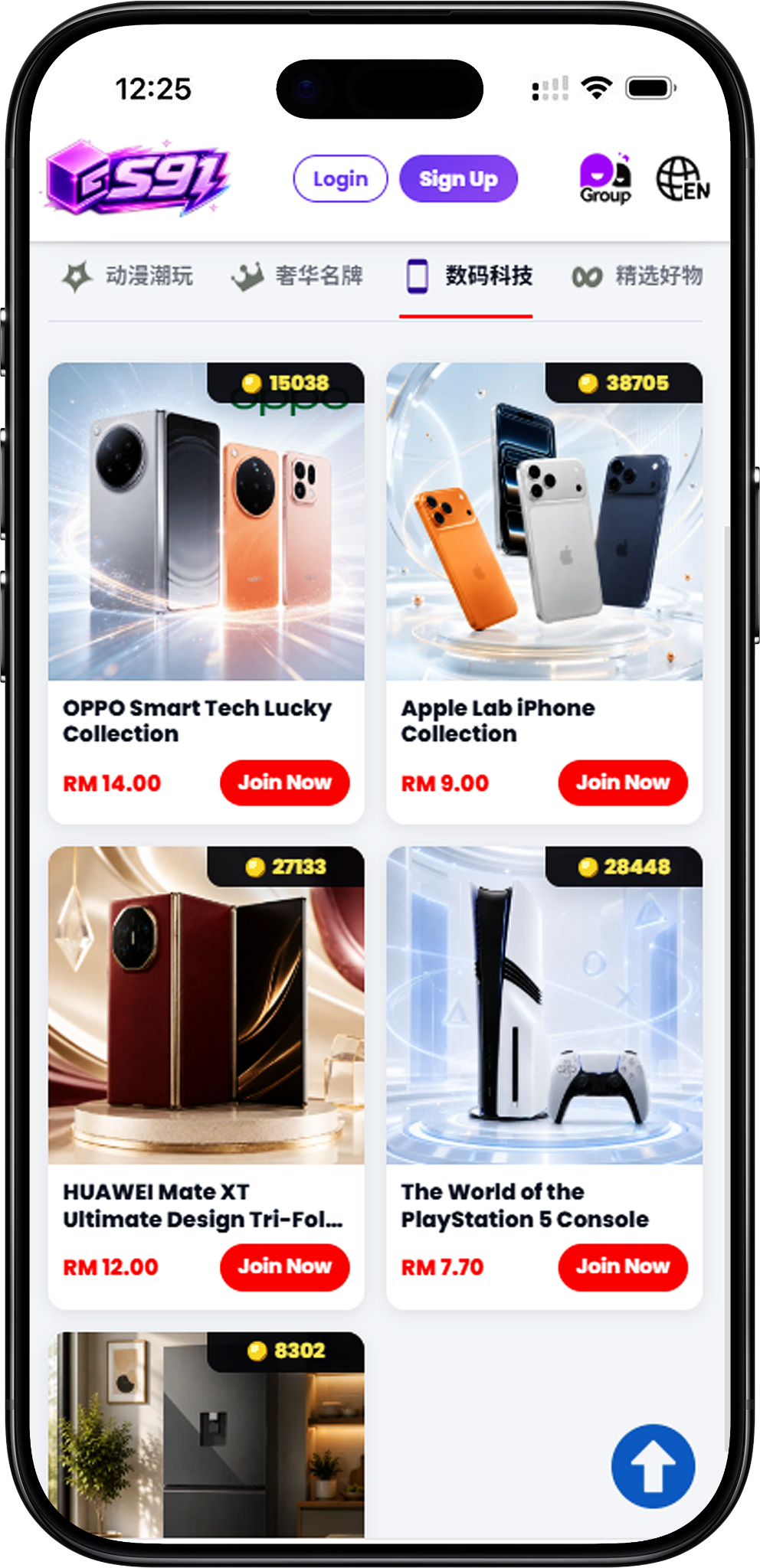
S91 Digital Technology Lucky Draw is the technology-focused category within S91BOX Lucky Draw. The category presents different technology themes as individual draws, allowing users to browse the available choices and select Join Now to enter the corresponding draw page.
Technology Categories in One Place
Digital Technology covers several types of products rather than focusing on one device category. The selections shown include action cameras, a tri-fold smartphone, a gaming console and smart home technology, giving users different technology-themed Lucky Draw options to explore.
What Types of Digital Technology Lucky Draw Are Available?
The Digital Technology category currently includes all four displayed Lucky Draw selections: DJI ACTION DUO, HUAWEI Mate XT Ultimate Design Tri-Fold Smartphone, The World of the PlayStation 5 Console, and Home Lab Smart Home. Each appears as its own Lucky Draw with a displayed entry price and Join Now option.
DJI ACTION DUO
DJI ACTION DUO is the action-camera-themed selection in Digital Technology. Open this Lucky Draw to view the products displayed within the draw, together with the current draw information and available participation controls.
HUAWEI Mate XT Ultimate Design Tri-Fold Smartphone
This Digital Technology Lucky Draw focuses on the HUAWEI Mate XT Ultimate Design Tri-Fold Smartphone theme. Select Join Now from the category page to open its individual draw and review the information displayed by S91BOX.
The World of the PlayStation 5 Console
The World of the PlayStation 5 Console is the gaming-focused selection within the Digital Technology category. Users interested in this draw can open its dedicated page to review the displayed items and draw details before proceeding.
Home Lab Smart Home
Home Lab Smart Home represents the smart-home selection in the category. Its individual Lucky Draw can be accessed from the Digital Technology page through the corresponding Join Now button.
How to Join a Digital Technology Lucky Draw
The S91BOX interface provides a direct path from browsing Digital Technology selections to choosing a draw quantity and reviewing payment. Check the information shown on each screen before confirming participation.
Step 1: Open Digital Technology
Go to the S91BOX Lucky Draw section and select Digital Technology from the category navigation to display the available technology-themed draws.
Step 2: Choose a Lucky Draw
Compare the available Digital Technology selections and their displayed prices. Select Join Now on the draw you want to explore.
Step 3: Review the Available Items
The individual draw page displays the items associated with that Lucky Draw. Review the product information and values shown on the page before choosing how many draws to make.
Step 4: Select Your Draw Quantity
Choose from the displayed Draw 1, Draw 3, Draw 5 or Draw 10 controls. These options let you select the number of draws before continuing to payment.
Step 5: Confirm the Payment Details
The Confirm Payment panel shows the Wallet Balance, payment selection, voucher area and total amount for the chosen draws. Review the displayed total and other details before selecting Pay Now.
Understanding Digital Technology Draw Results
The individual Digital Technology Lucky Draw page provides result information alongside the available products. Users can review the displayed draw number and result categories before participating.
SP, A, B and C Results
The Digital Technology draw interface displays SP, A, B and C as result categories. The percentage shown beside each category can vary by Lucky Draw, so users should refer to the figures displayed on the specific draw page they are viewing.
Draw Number
A current Draw # number is displayed within the Lucky Draw interface. This provides a reference for the draw being shown and can also be used when reviewing records in the History section.
Review the Displayed Products
Products within an individual Digital Technology draw are displayed with their names and values where provided by S91BOX. Review the available items directly on the selected draw page for the most relevant information.
How to Check Lucky Draw History
S91BOX provides a History function within the Digital Technology Lucky Draw interface. It allows users to review previously displayed draw records and filter the history by result category.
Open the History Panel
Select the History button on the draw page. The panel displays previous records with details such as the user, time, amount, draw number and result category shown for each entry.
View All Draw Records
Select All to browse the combined history records displayed for the Lucky Draw rather than limiting the list to a specific result category.
Filter SP and A Results
The History panel provides dedicated SP and A filters. Select either option to focus the history list on records displayed under that result category.
Check Draws Without SP or A
The History interface also displays counters showing the number of draws without an SP result and without an A result. These figures should be treated as current interface information because they can change as additional draws occur.
S91 Digital Technology Lucky Draw FAQ
What is the S91 Digital Technology Lucky Draw?
It is a Lucky Draw category on S91BOX focused on technology-themed selections, including cameras, smartphones, gaming and smart home products.
What Digital Technology Lucky Draws are available?
The category currently displays DJI ACTION DUO, HUAWEI Mate XT Ultimate Design Tri-Fold Smartphone, The World of the PlayStation 5 Console, and Home Lab Smart Home.
How do I join a Digital Technology Lucky Draw?
Select Digital Technology, choose one of the available draws, and click Join Now. On the individual draw page, review the displayed information and select an available draw quantity before proceeding.
How many draws can I select?
The displayed interface provides Draw 1, Draw 3, Draw 5 and Draw 10 options. Select the quantity you want before reviewing the payment details.
Can I check previous Digital Technology draw records?
Yes. Select History on the individual draw page to view the records displayed by S91BOX and use the available result filters when needed.
Can I see the amount before confirming payment?
Yes. The Confirm Payment panel displays the total amount for the selected draws along with the available Wallet Balance, payment and voucher information before Pay Now is selected.
Explore S91 Digital Technology
Browse all Digital Technology Lucky Draw selections on S91BOX, choose the technology theme that interests you and review its draw details before joining.